Singapore Grand Prix Race Weekend Checklist: Digital Tickets, Bag Rules, Offline Maps & Connectivity Survival
Last updated: 08 October 2026
Written by: Joelle Tello
10 minutes read
Quick Answer
The 2026 Formula 1 Singapore Airlines Singapore Grand Prix runs from 9 to 11 October 2026 at the Marina Bay Street Circuit. It is Round 17 of the FIA Formula One World Championship and Singapore's first Sprint weekend. The Grand Prix starts at 20:00 SGT (UTC+8) on Sunday 11 October. General tickets are mobile tickets in the Singapore GP app. Open yours at home so it saves to your phone, because screenshots and printouts are not accepted at the gates. Bags are capped at 20 litres. Save an offline circuit map, add a card to your phone wallet, pack a power bank and sort your mobile data before you head to Marina Bay.
2026 First-Ever Sprint Weekend at Singapore GP
Day | Session | Local Time (SGT) |
Friday 9 Oct | Practice 1 | 16:30 to 17:30 |
Friday 9 Oct | Sprint Qualifying | 20:30 to 21:14 |
Saturday 10 Oct | Sprint | 17:00 |
Saturday 10 Oct | Qualifying | 21:00 |
Sunday 11 Oct | Grand Prix | 20:00 |
The 2026 Singapore GP is Singapore's first Sprint weekend, so there is only one practice session.
Key Takeaways
General tickets go live in the Singapore GP app. Open your ticket at home so it saves to your phone, because screenshots, videos and printouts are not accepted at the gates.
Bags over 20 litres in capacity are not allowed. A small daypack or sling bag clears security fastest.
Power banks are not on the official prohibited list, and the circuit has power bank rental stations near selected Information Booths. Bring one, because phones drain quickly in a long, crowded night.
Most food and merchandise outlets at Marina Bay take contactless cards and mobile wallets, so add a card to your phone wallet before you go.
Downloading offline maps and coordinating designated physical meeting spots with your group prevents communication breakdowns if mobile data slows down during headliner concerts.
Before You Head to Marina Bay, Read This
Race weekend at the Marina Bay Street Circuit asks a lot of your phone across three days of sessions and concerts. In 2025, the Singapore GP recorded 300,641 fans over the weekend, with more than 60,000 at the Padang each night.
When the network gets congested at peak moments, simple tasks like loading a seat map, clearing a card payment, or texting your group become unexpectedly difficult. There is a reason mobile connectivity at Marina Bay behaves differently during race weekend compared to any other time of year.
This Singapore GP checklist covers everything you need to prepare on your phone, pack in your bag, and set up before you leave so race weekend runs exactly as it should.
The 60-Second Race Weekend Packing & Tech Checklist
If you are packing your bag right now, use this quick reference table to make sure your gear complies with official venue regulations.
Category | Recommended / Allowed | Not Allowed / Restricted |
Digital & Access | Singapore GP app with your ticket opened and saved, pre-loaded digital wallet, photo ID as a precaution | Screenshots, videos or printouts of tickets |
Hardware & Power | Fully charged phone, power bank, short charging cable | Drones and other remote-controlled devices, laser pointers, selfie sticks, monopods or tripods extended beyond 30cm, camera setups over 30cm combined length |
Bag & Storage | Small sling bag or daypack, 20 litres or less | Trolleys and luggage, bags over 20 litres, chairs and stools |
Weather & Comfort | Compact rain poncho, earplugs, one water bottle (up to 1 litre)* | Outside food and drinks, glassware, canned drinks. Umbrellas should not be used at grandstands, viewing platforms or the Padang Stage fan zone |
Digital Tickets & Gate Entry: How to Avoid Turnstile Delays
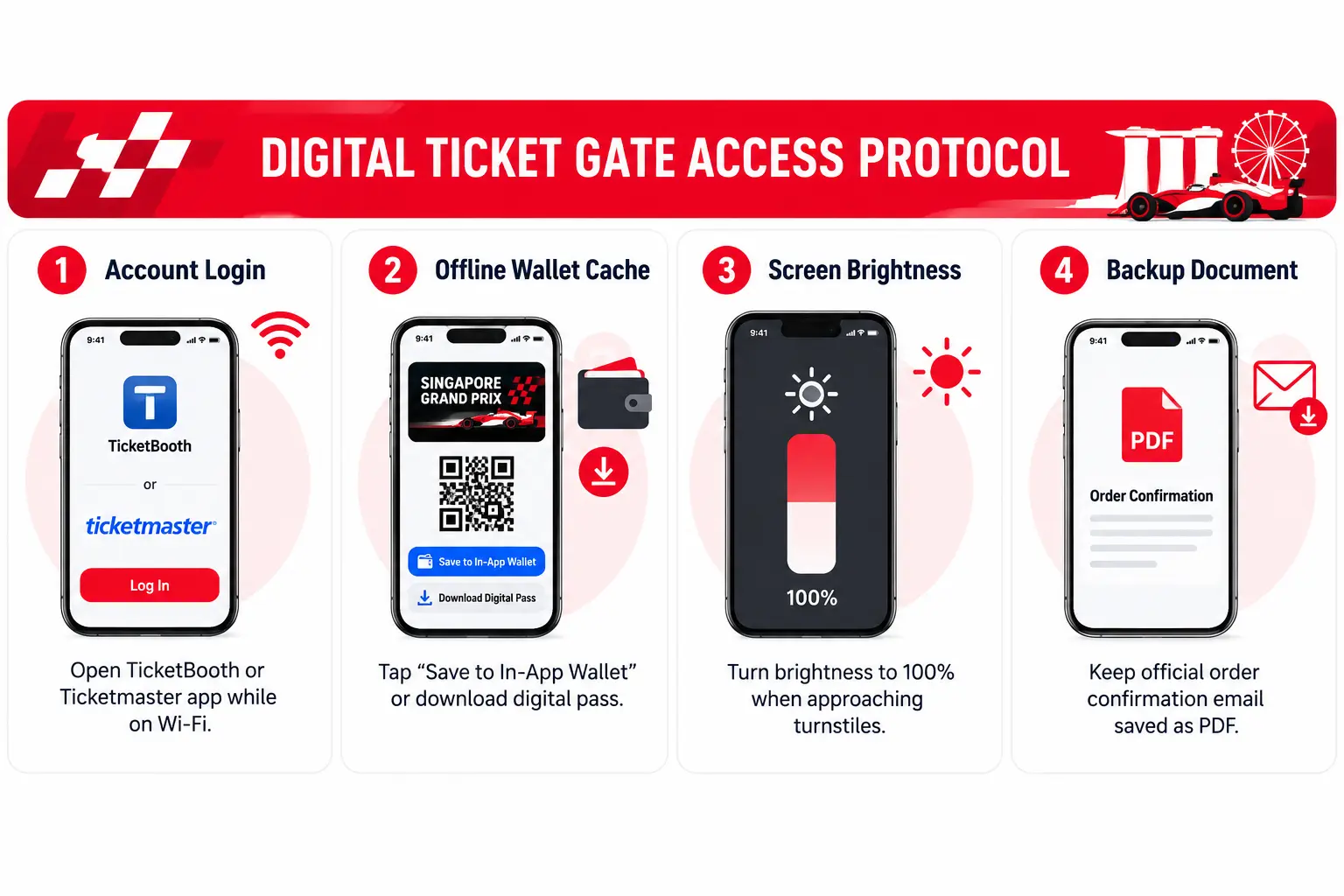
General Grandstand, Walkabout, and Wheelchair Accessible tickets for 2026 are mobile tickets in the Singapore GP app. Sign in with the email used to buy the ticket, or the email it was transferred to, and open the ticket before you leave. Once opened, it saves to your phone and works without the internet.
Paddock Club, Hospitality Suites and Super Pit Grandstand customers receive physical tickets instead.
To make sure you clear the gates smoothly:
Allow at least 60 minutes before your first target session: Security queues build as support races finish, not when your main session starts.
Check you can see it offline: Switch to aeroplane mode and confirm the ticket still shows.
Carry photo ID as a precaution: The official event guide does not list ID as an entry requirement, so keep your login email handy too, since the ticket is tied to it.
Plan for a flat battery: Ticketing booths sit next to Gates 1, 2, 3, 4, 5 and 8. If you bought through an official reseller, contact them for help with access. Charge your phone before you queue and carry a power bank.
Understanding the strict Singapore GP entry requirements before you travel downtown prevents unnecessary delays and keeps you moving quickly into your viewing zone.
Bag Policy, Power Banks & Gear Regulations
Security screening at the Marina Bay Street Circuit is thorough, with bag checks conducted at every perimeter gate. Packing light is the single most effective way to clear the security lines quickly.
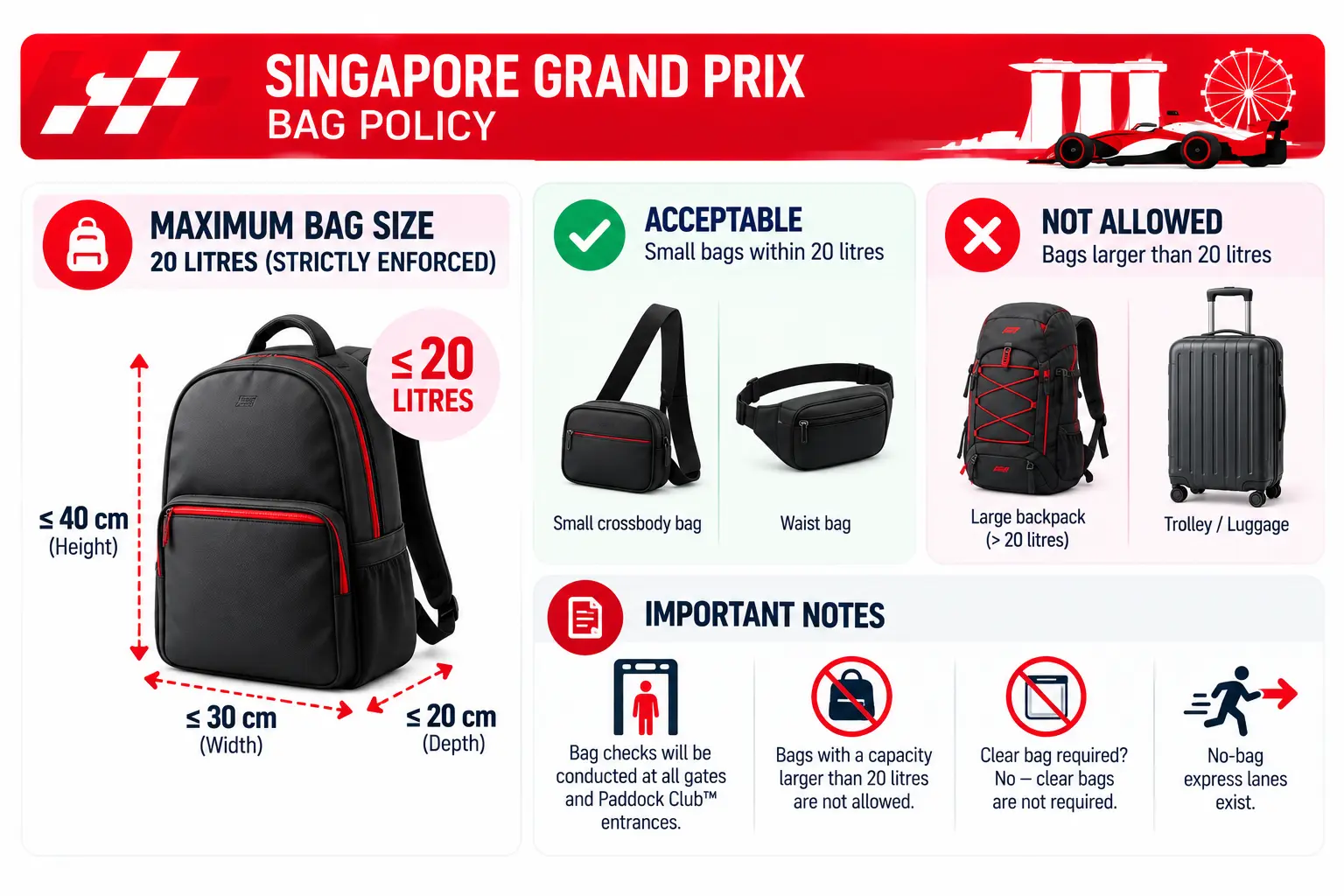
Per the official Singapore GP prohibited items list, bags with a capacity larger than 20 litres are not allowed, and neither are trolleys or luggage. The official event guide does not list bag storage at the gates, so leave oversized bags at your hotel.
Preparing Your Phone Before Leaving Home
Taking five minutes to adjust your phone settings before leaving home saves substantial battery life and cellular data during the race sessions.
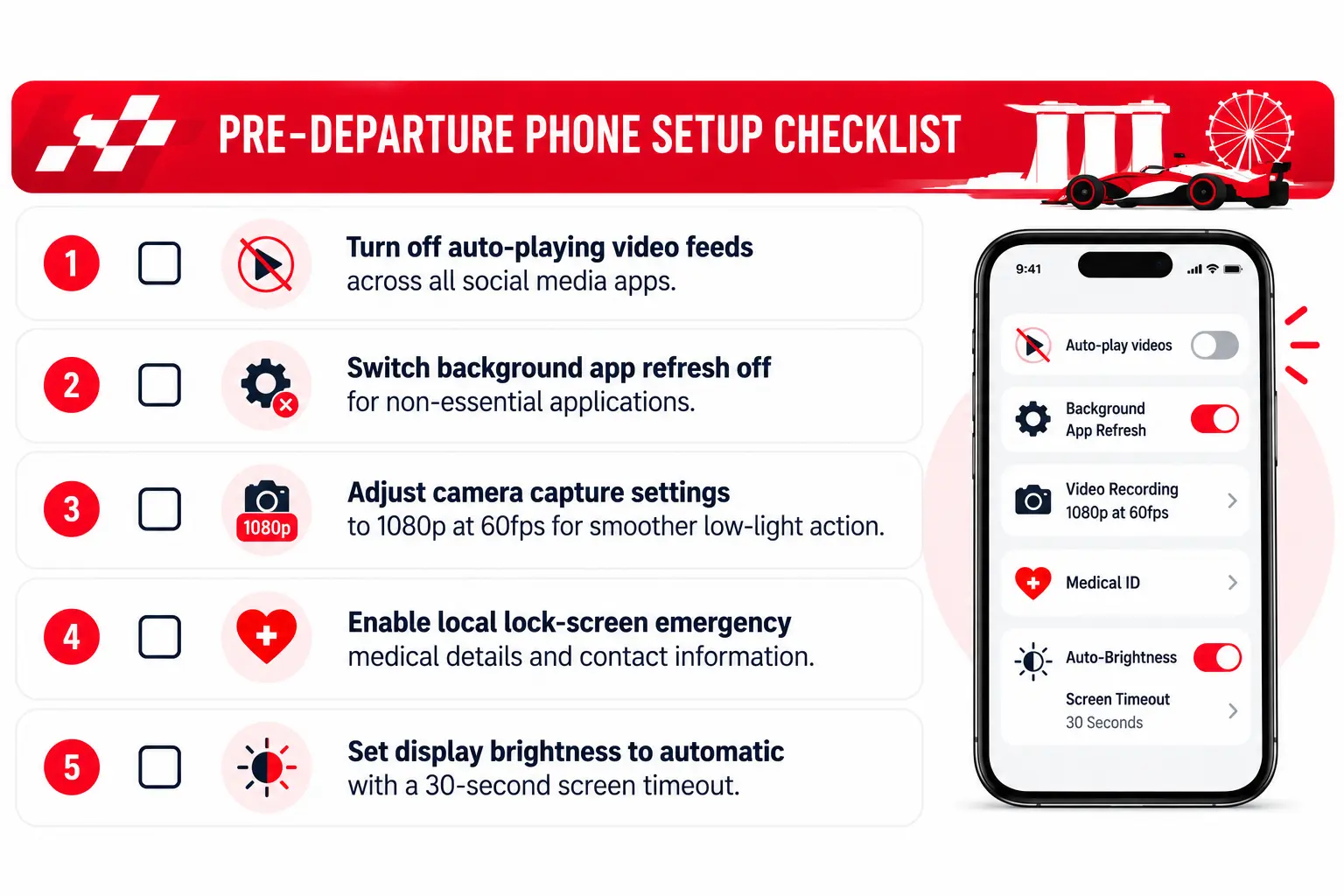
Applying basic data-saving phone settings before heading out prevents background updates from consuming bandwidth when you need it most.
Circuit Maps & Gate Routing: MRT Stations and Offline Navigation
The Marina Bay Street Circuit lap is 4.927km, and the circuit park is split into ticketed zones. Ticketing partners report that walking between Zone 4 and Zone 1 can take 30 to 45 minutes, so plan your route before the evening crowds build.
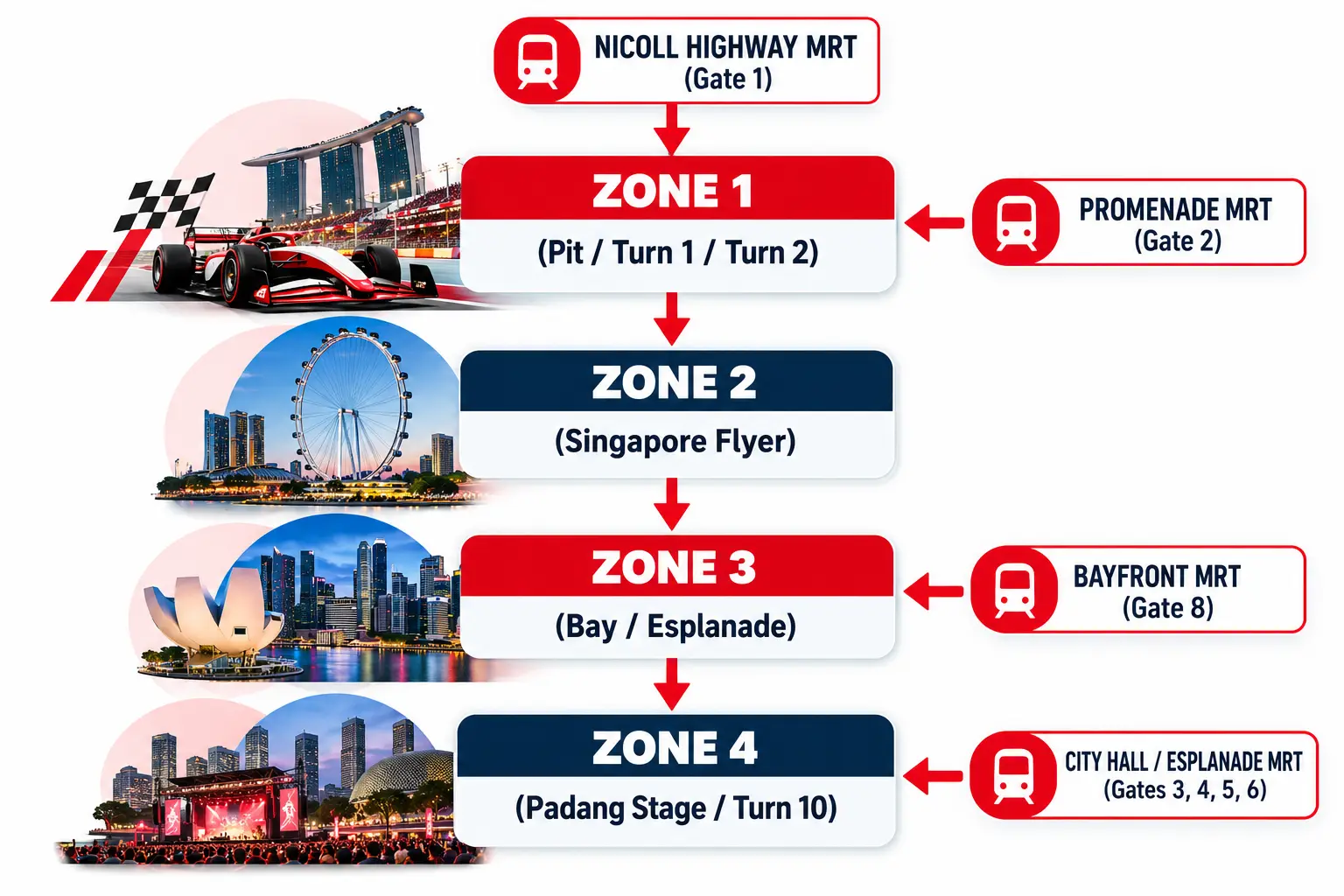
Download a high-resolution PDF copy of the official Singapore GP circuit map directly to your phone files or photo gallery before leaving your room.
Having a saved copy of the SG GP map ensures you can quickly locate your designated grandstand, first aid stations, merchandise booths, and water refill points even when your mobile signal fluctuates.
Your ticket determines which zones you can access, and which concert stages you can reach.
Zone 4 only tickets cover the Padang Stage and Zone 4 areas, and do not open Zones 1 or 2. Zone 1 and Zone 2 tickets can also reach the general areas in Zone 4, but you need a wristband to move between zones. Collect it from Information Booths in Zones 1 and 2 or at internal gates.
The Wharf Stage is in Zone 1, so check your ticket type before you plan your evening.
Gate and MRT Transit Directory
Planning your Singapore GP transport route around your specific ticket gate saves significant walking time around the closed perimeter roads.
Gate | Nearest MRT | Lines | Area |
Gate 1 | Nicoll Highway | Circle Line | Zones 1 and 2 |
Gate 2 | Promenade | Circle Line, Downtown Line | Zones 1 and 2 |
Gate 8 | Bayfront | Circle Line, Downtown Line | Zones 1 and 2 |
Gates 3A, 3B, 7 | City Hall, Esplanade | North-South, East-West, Circle Line | Zone 4 |
Gates 4, 5, 6 | Raffles Place | North-South, East-West Line | Zone 4 |
Roads around Marina Centre and the Padang are closed from 12:01 am on Wednesday 7 October to 5:30 am on Tuesday 13 October, making public transport the most reliable way to reach the circuit.
The last trains from City Hall on the North-South and East-West Lines leave at 12:30 am after Friday and Saturday's sessions, and at 12:45 am after Sunday's race. Other lines also run later, except the Changi Airport service.
Taxis can use the Raffles Boulevard Access Lane except during F1 track activity, and private hire cars can only pick up and drop off at designated points.
If your ticket grants you access to specific seating areas, consult a dedicated Singapore GP grandstand map ahead of time. This helps you identify whether entering via Stamford Gate (Gate 3A or 3B) or Empress Gate (Gate 4) provides the most direct walking path to your assigned seat.
For fans holding general admission tickets, studying the F1 Singapore GP map allows you to pinpoint elevated viewing platforms along the Esplanade Waterfront early in the evening before crowds gather for qualifying and the race.
Singapore GP 2026 Concert Schedule by Stage and Zone
Date | Artist | Stage | Zone |
Friday 9 Oct | JJ Lin, CORTIS | Padang Stage | Zone 4 |
Friday 9 Oct | Split Enz | Wharf Stage | Zone 1 |
Saturday 10 Oct | Zara Larsson, The Killers | Padang Stage | Zone 4 |
Saturday 10 Oct | Goo Goo Dolls | Wharf Stage | Zone 1 |
Sunday 11 Oct | James Arthur, Lana Del Rey | Padang Stage | Zone 4 |
Sunday 11 Oct | Janet Jackson | Wharf Stage | Zone 1 |
*Lineup and set times are subject to change. Check the official entertainment schedule on race day for live updates.
Singapore GP Connectivity: Best Mobile Data Plans to Stay Connected During Race Weekend
At peak moments such as the race start, safety car restarts and headline sets on the Padang Stage, thousands of phones compete for the same cell sites.
Why Mobile Networks Slow Down at Marina Bay
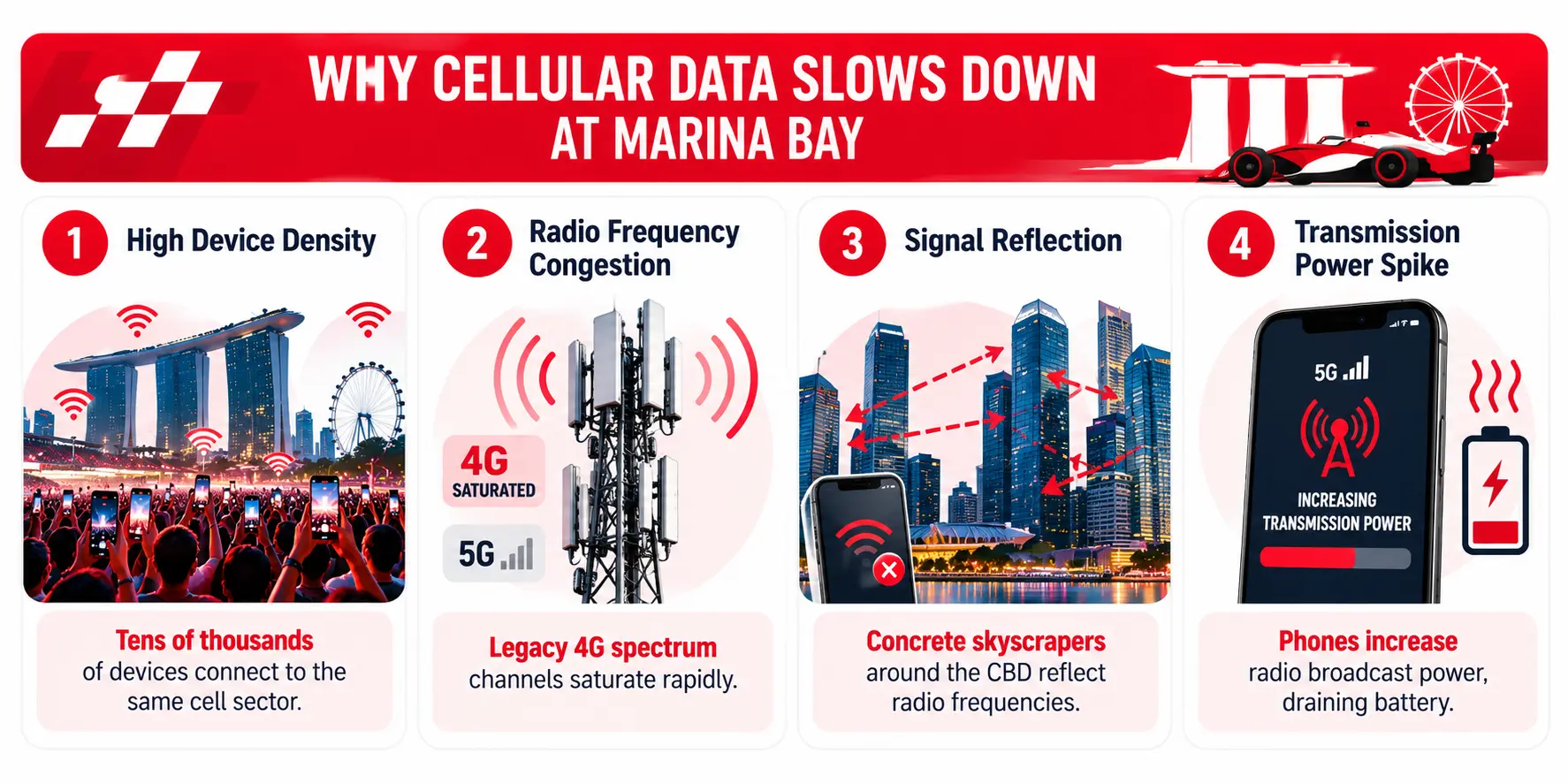
When thousands of phones connect to the same cell site, each device gets a smaller share of capacity, and 4G users usually feel it first. 5G Standalone is built to handle more devices per site with lower latency.
A 5G plan on a 5G-capable phone gives you access to that newer network. No plan can guarantee speeds in a packed crowd.
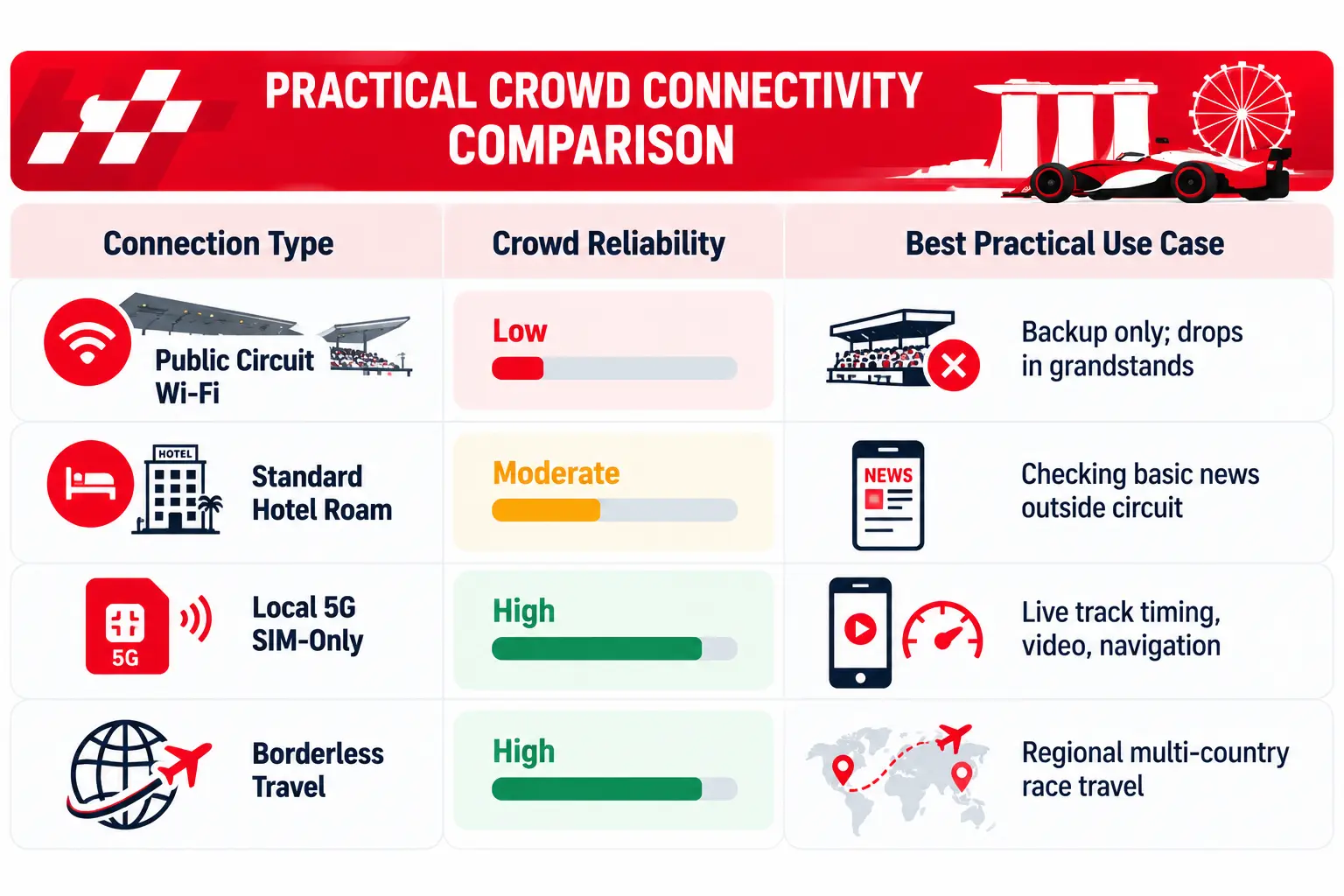
Local fans can pick a plan with plenty of data for live timing apps, photo sharing and messaging. Circles Plus 5G and Circles Pro 5G also include roaming data if you travel after the race.
Stay Connected at Singapore GP: Best Mobile Data Plans for Singapore GP Weekend
According to official reporting from the IMDA Digital Connectivity Blueprint, Singapore's first two 5G Standalone networks reached 95% nationwide outdoor coverage by the end of 2022.
Plan | Ideal For | Race-Weekend Benefit | Data & Pricing |
Everyday race-day use | 500GB with 5G access for messaging, live timing apps and photo sharing | 500GB for $8/mth (promo: free 5G for 6 months, no contract) | |
Tablets, hotspots & spare phones | Dedicated connection for running live timing and track maps on a second screen | 1TB 5G data for $20/mth (Contract-free SIM or eSIM) | |
Creators & heavy data users | Maximum data allocation for uploading 4K clips, live streams, and concert sets | 1TB 5G data for $30/mth (Full 5G data, calls & SMS) |
Messaging and Communication Hacks When Data Slows Down
If you are coordinating with friends inside the circuit and messaging apps begin to lag, use standard SMS or add exact time stamps to your messages (for example: "At Turn 3 bar, 7:15 pm"). This ensures your group knows when the message was sent even if network delivery is delayed by a few minutes.
Cashless Venue Spending: Cards, Mobile Wallets & Food Villages
Most food and merchandise outlets at Marina Bay take contactless cards and mobile wallets, so add a card to your phone wallet before you go.
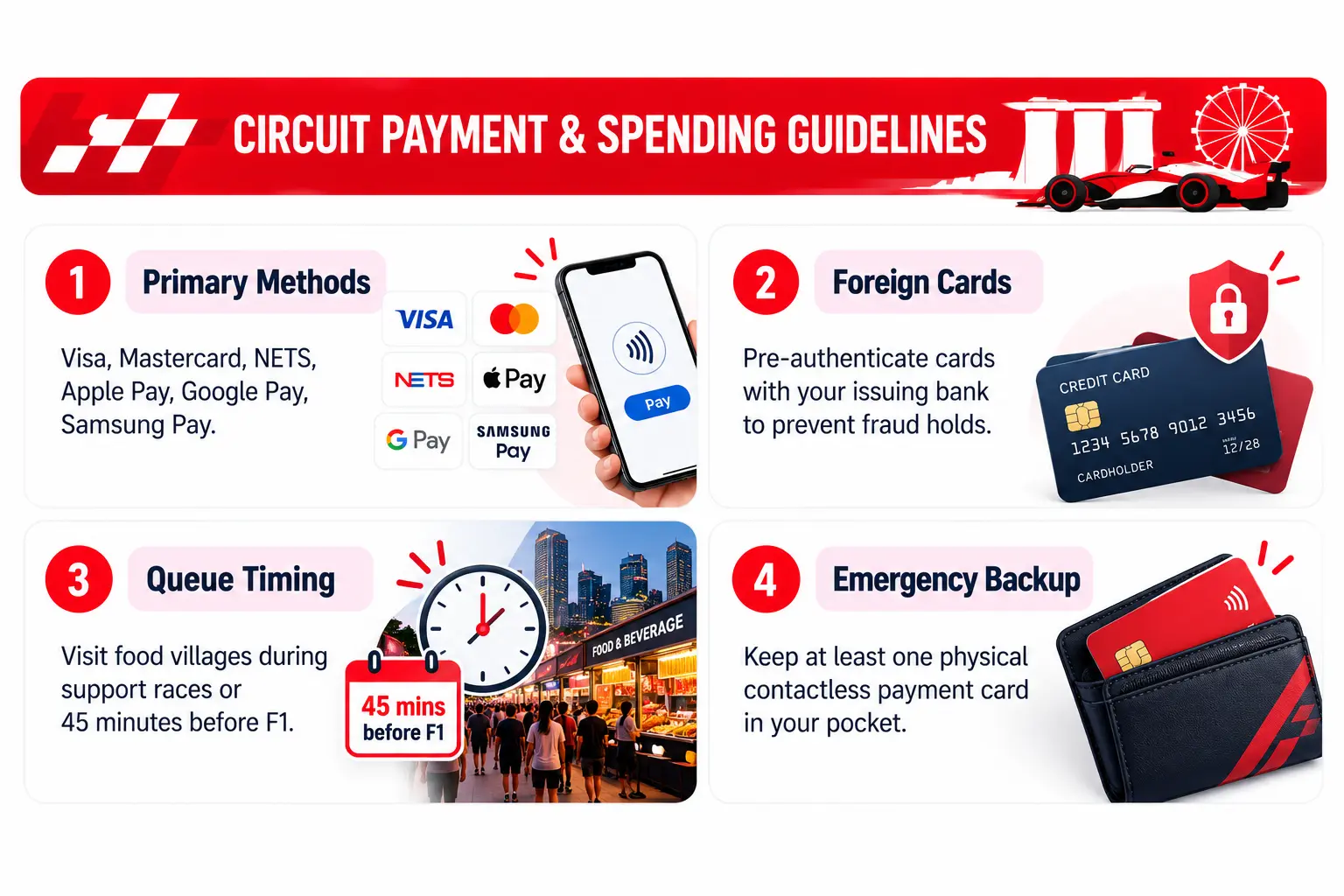
To avoid payment difficulties at busy food and merchandise stalls:
Pre-load digital cards into your mobile wallet: On-device wallet payments do not require active cellular reception at the moment of payment, allowing transactions to process even when mobile networks are congested.
Carry one physical backup card: While mobile wallets are convenient, keep a physical contactless credit or debit card stored securely in your bag in case your phone battery runs out.
Notify your bank of travel plans: If you are visiting from abroad, ensure international transactions are unlocked on your cards before arrival. Two-factor authentication SMS messages from overseas banks can fail to arrive if your roaming reception drops, which may cause card transactions to decline.
Time your dining visits: Food village queues peak immediately after Formula 1 practice, qualifying, and race sessions finish. Ordering food thirty minutes before track sessions end allows you to collect meals in a fraction of the time.
Battery Preservation: Surviving an Eight-Hour Trackside Day
A typical day at the Grand Prix lasts between six and nine hours from afternoon gate opening until the final concert finishes.
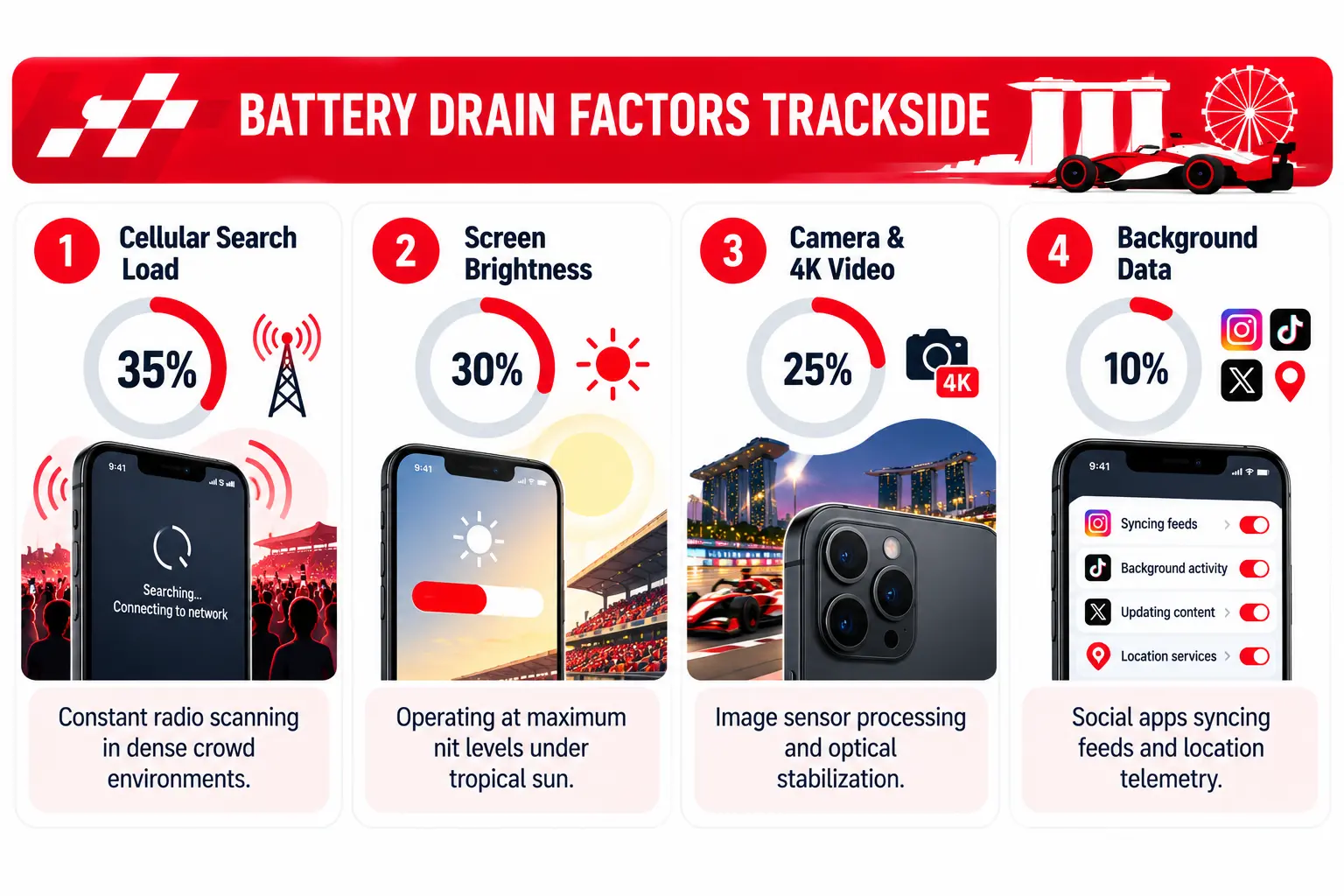
Phones raise their transmit power when the signal is weak, and they keep retrying uploads and refreshes when a network is congested. Both use extra battery in a packed crowd, along with camera use, GPS and a bright screen.
To keep your phone operational throughout the night:
Turn on Low Power Mode early: Enable battery saver mode when you enter the circuit rather than waiting until your device drops to 20%. This limits background sync, reduces screen refresh rates, and conserves power for camera use and essential communication.
Keep your phone cool: Avoid leaving your phone on hot metal grandstand benches or in direct sunlight. High ambient temperatures trigger thermal throttling, slowing down device performance and accelerating battery depletion.
Limit background video uploads: Capture your race videos and high-resolution photos freely, but wait until you return to your hotel Wi-Fi to upload large albums and stories to social media.
Post-Race Exit Plan: Navigating Crowd Outflows Without Gridlock
When the chequered flag falls, or the Padang headliner finishes, tens of thousands of fans head for the exits at once.
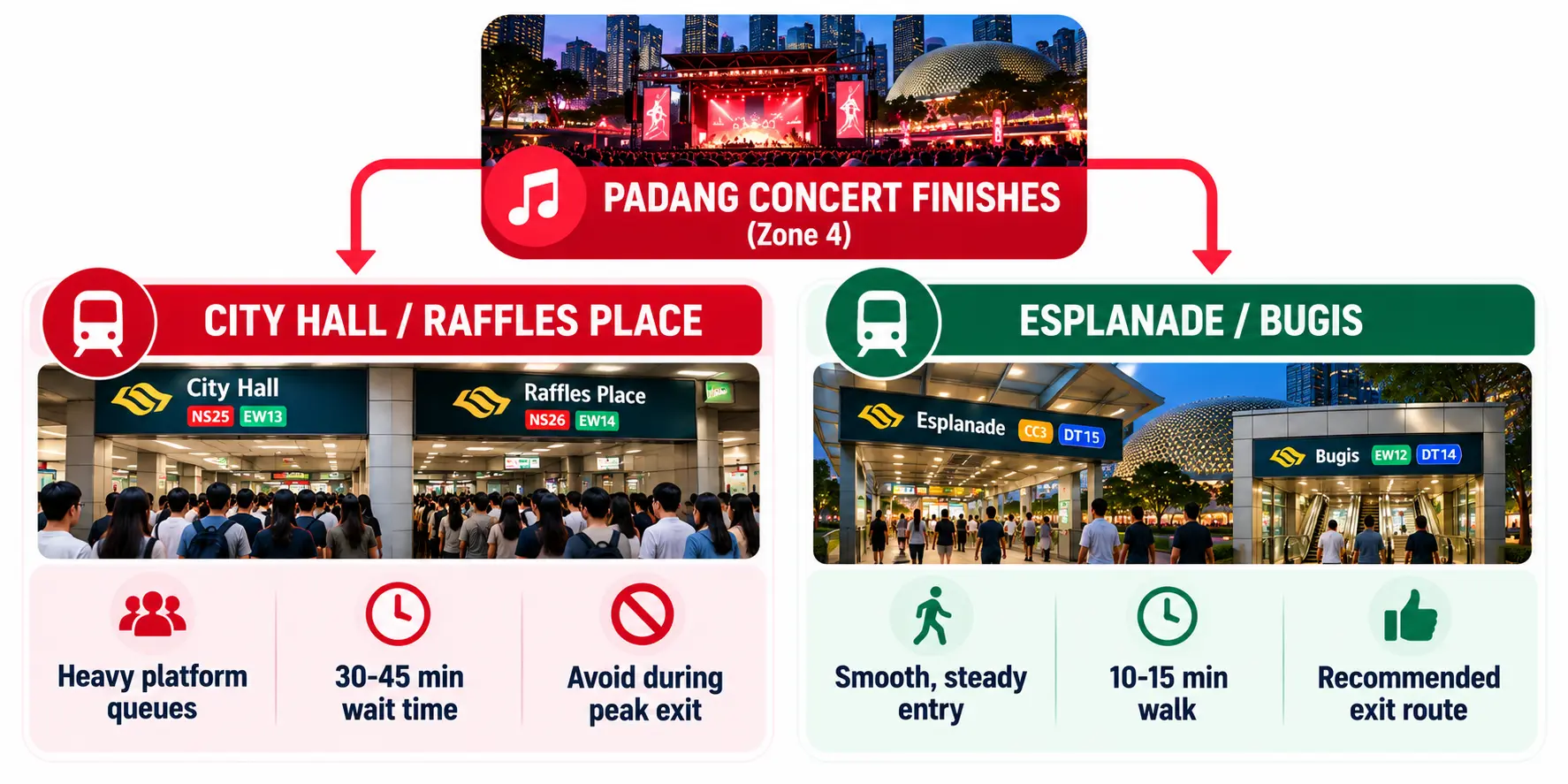
Planning your exit strategy prevents unnecessary waiting in crowded train stations:
Managing your post-race transit: Main transit hubs like City Hall and Bayfront experience heavy passenger surges immediately after track sessions conclude. While City Hall operates extended train services to accommodate post-race crowds, pacing your departure or walking to nearby alternative stations like Downtown or Clarke Quay can help you avoid the densest platform queues.
Do not count on a quick ride-hail pickup: Private hire cars can only pick up and drop off at designated points, and taxis can only use the Access Lane outside F1 track activity hours. Expect queues and surge pricing after the race.
Stagger your departure: Leaving forty-five minutes after the track action concludes allows the initial crowd rush to clear from the transit hubs.
Track walk: Fans have been able to walk on sections of the track after the final session in past years. It is not listed in the official 2026 event guide, so ask at an Information Booth or check the Singapore GP app on the day.
Final Pre-Departure Checklist: Before Singapore Grand Prix Race Weekend
Before heading out the door to Marina Bay, take sixty seconds to review this final pre-race checklist.
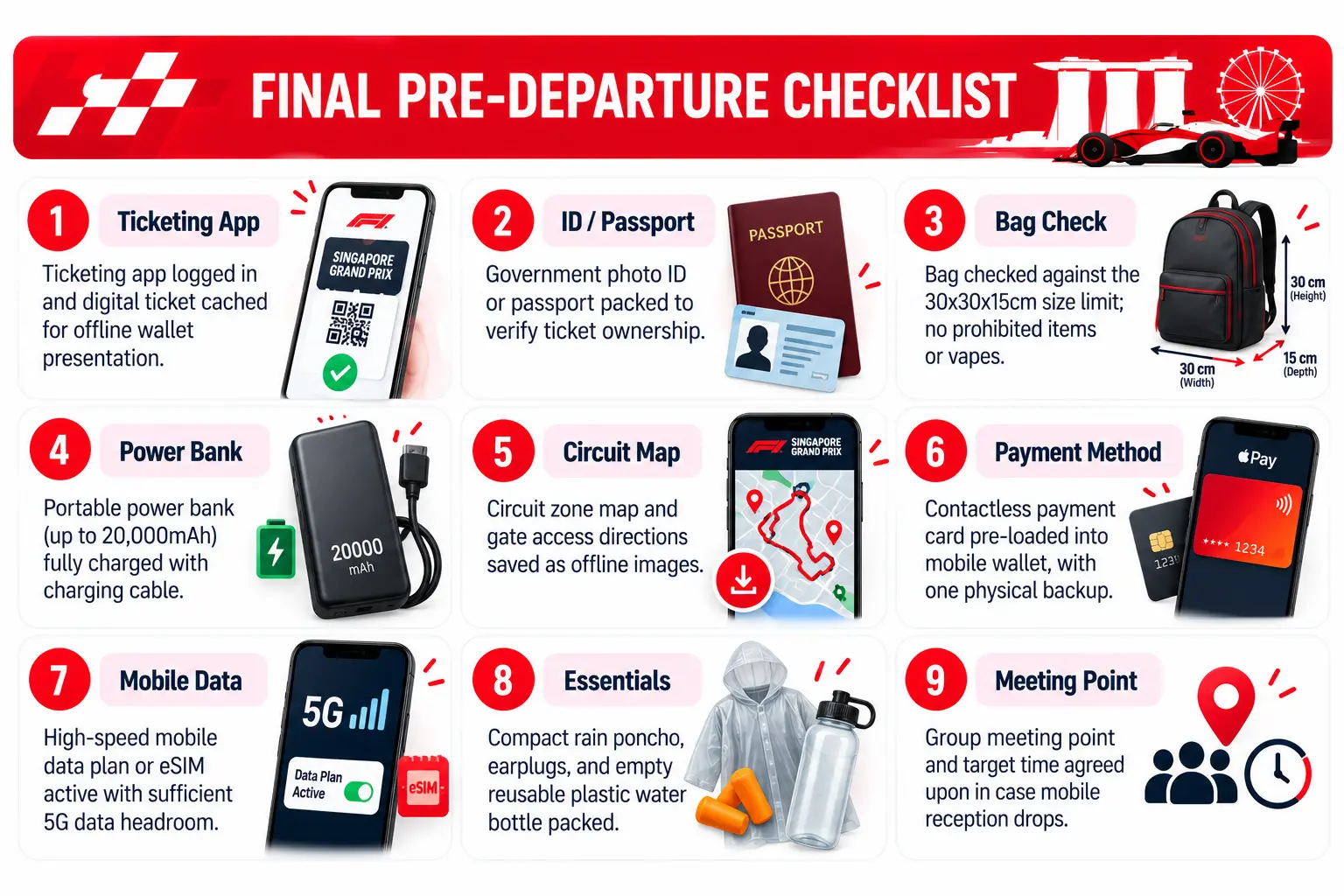
Before You Leave for Marina Bay
A stalled ticket scan at the gate, a declined card at the food village, a dead phone in the grandstand. None of these has to happen. Ten minutes of prep tonight prevents all three.
Cache your ticket. Check your bag. Save your maps. Charge everything.
If your current plan cannot handle sixty thousand people reaching for their phones at lights out, that is worth fixing before Friday. Circles.Life 5G plans are built for exactly this kind of network demand.
Flying in? Skip the airport SIM queue. Activate a Circles.Life eSIM before you fly and land already connected.
The rest will take care of itself. Make sure your phone does too.
Conclusion
A laptop hotspot only does its job if the plan behind it is built for the number of devices you're putting on it.
For light, single-device WFH days, opting for a Circles.Life data-only plan keeps a single-laptop setup simple and cost-effective. For anyone juggling video calls, heavy file uploads, and hot-spotting multiple devices at once, upgrading to a high-speed Circles.Life 5G plan removes latency and bandwidth bottlenecks before they start.
Either way, reviewing your actual usage pattern before signing up ensures you get the exact capacity you need without overpaying or running out of data mid-month.
ABOUT THE ARTICLE
Published 2026/10/08
Written by Joelle Tello


Related Blogs
Poor mobile coverage on Sentosa or Pulau Ubin? Here is what to expect on Singapore’s islands and how to stay connected. Check your plan today.
Heading to Little India for Deepavali 2026? Here are light-up hours, Festival Village dates (till 8 Nov) and how to avoid a dead signal on the night
How far does 10GB data stretch in Singapore? Join Circles Life as we break down data usage across various platforms and guide you to the right plan.

Want more?
Subscribe to our newsletter and get notifications when there’s more to read!
By submitting your details, you consent to us sending you promotional and marketing updates. Please read our Privacy Policy for more information.